Paper Fold
CASUAL AZUR GAMESPuzzle
4.514.92K Reviews
- Version
- 200365
- Installs
- 100.00M
- Age Rating
- Everyone
Screenshots
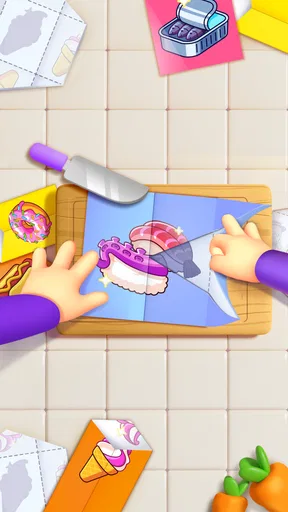
Our Review of Paper Fold
 Analysis by Appyee
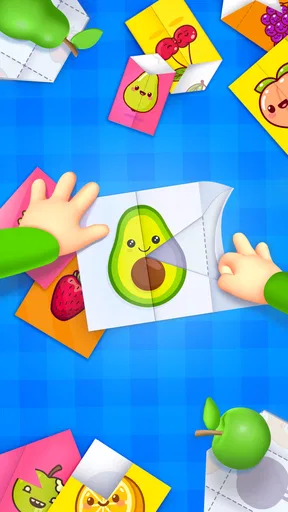
I usually reach for a small puzzle when I have a few minutes to spare but don’t want to commit to a long story or a complicated ruleset. Paper Fold suits that mood: its central idea is to fold a flat picture in the right sequence until the hidden image becomes clear. The appeal is immediate, but the best way to enjoy it is to treat each level as a quiet visual problem rather than a race. That makes it easy to pick up between errands, while also giving the more confusing pictures room to slow me down.
What a quick session feels like
The basic interaction is simple enough to understand without a long tutorial: look at the picture, decide which part should fold over, then make a move and see how the image changes. The challenge is in reading the layers and order, not in learning a complicated control scheme. I find that distinction important. If you want a puzzle that asks you to plan a route across a large board, this is not that; if you enjoy spotting how pieces of an image fit together, it has a much gentler entry point.
That simplicity also shapes expectations about speed. A level can feel brisk when the folds are obvious, but a less familiar image can make me pause and reconsider the sequence. I wouldn’t judge it by how quickly I clear a run. The satisfying part is often noticing a detail that changes what I thought the next fold should be. For a short break, that gives the game a useful rhythm: a few quick decisions, then a natural stopping point when I’m ready to put the phone down.
When the puzzle takes more attention
The game is most engaging when I stop tapping by instinct and inspect the picture before folding. A practical habit is to look for which shapes would be covered by another layer and which outlines need to remain visible in the finished image. If I make a move too quickly, I can lose track of why the composition no longer matches what I expected. Taking a moment to mentally trace the overlap is a small adjustment, but it makes the puzzle feel more deliberate and can reduce aimless retries.
This is also where the experience differs from a conventional jigsaw or a number-based logic puzzle. There isn’t a scattered collection of pieces to arrange, and the problem isn’t about calculating a chain of moves across a grid. Instead, the picture itself is the clue, and the folding order is the question. I’d choose a jigsaw when I want a longer, more open-ended activity; I’d choose this when I want a compact visual task with a clear result at the end.
There are moments when the minimal premise can feel limiting. If a level’s image doesn’t make the intended order apparent to me, I may spend more time guessing than reasoning. Hints can help me get moving again, but I prefer to use one only after I’ve checked the likely overlaps for myself. That keeps the assistance useful without turning every puzzle into a sequence I simply follow. Players who dislike trial and error, or who want deep strategic systems and extensive control over how they solve a puzzle, may find the format too narrow.
Folding Fun: Getting Started
Jumping into Paper Fold is as easy as pie. The app has a clean and straightforward interface, so you won't be fumbling around trying to figure things out. Once you fire it up, you're greeted with a series of paper folding puzzles that start off easy but quickly ramp up in complexity. The goal? Fold the paper just right to match the given pattern. Simple, right? Well, not always!
The controls are intuitive. You simply swipe and tap to fold the paper, and the game does a good job of guiding you with gentle hints if you get stuck. But don't worry, the hints aren’t spoon-feeding you answers. They offer just enough direction to keep you from pulling your hair out when you’re stuck on a tricky level.
Visuals and Sounds: A Relaxing Combo
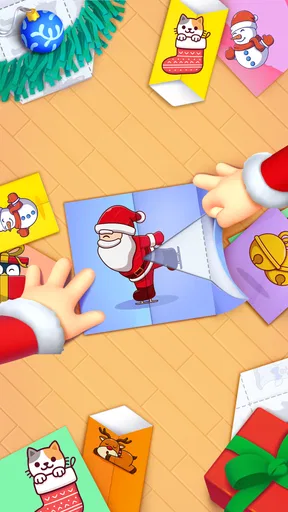
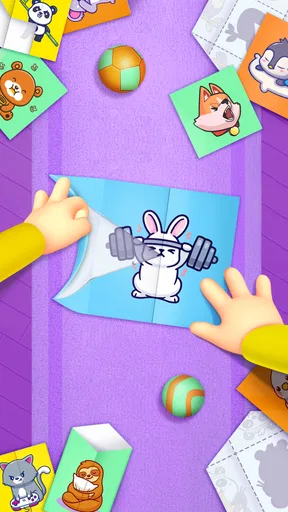
One of the first things that struck me about Paper Fold is how visually appealing it is. The graphics are crisp and colorful, making each puzzle a visual treat. The paper textures are surprisingly realistic, which adds to the immersive experience. It almost feels like you’re handling real paper.
The sound design complements the visuals perfectly. The gentle rustling of paper as you fold it is oddly satisfying, and the subtle background music is soothing enough to keep you relaxed through even the toughest puzzles. It’s like ASMR for puzzle lovers!
Challenges That Keep You Hooked
The beauty of Paper Fold is in its simplicity, but don't let that fool you into thinking it’s a walk in the park. As you progress, the puzzles get trickier, requiring more thought and precision. Some levels had me scratching my head, but that “aha!” moment when everything clicks is incredibly rewarding.
The app features a variety of themes and designs, keeping things fresh and engaging. From cute animals to intricate patterns, there’s always something new to look forward to. The developers have done a great job of balancing challenge with enjoyment.
Why You'll Keep Coming Back
While many puzzle games can become repetitive, Paper Fold keeps things interesting with its ever-evolving complexity and charming design. It’s perfect for those moments when you need a quick brain workout or just want to unwind after a long day.
Another neat feature is the ability to revisit completed puzzles. I found myself going back to earlier levels, trying to fold faster or with fewer moves, adding a layer of replayability that I wasn’t expecting.
Choosing it for the right reasons
For an everyday example, I’d play a couple of levels while waiting for a kettle to boil or sitting through a short commute. The pictures give my attention something specific to do, and the small scale makes it easy to stop without losing the thread of a larger campaign. It’s less suited to a crowded moment when I can only glance at the screen; even a simple fold asks me to look closely enough to understand how the image changes.
It also works best for people who enjoy visual recognition more than verbal clues or arithmetic. If you like noticing silhouettes, matching shapes, and testing how one layer covers another, the premise has a pleasant tactile feel. If your ideal puzzle is a crossword, a word search, or a sprawling logic challenge, this may be an occasional palate cleanser rather than a replacement. I would not expect it to satisfy someone looking for a deep progression system or a competitive score chase.
One useful approach is to pause after each fold and inspect the whole picture, not just the corner that moved. A fold can change the relationship between several shapes at once, so focusing narrowly on one detail can lead me toward a plausible but unhelpful next move. When a level becomes frustrating, I reset my mental picture by looking at the target again and identifying what must remain visible. That turns the task back into a visual deduction instead of repeated guessing.
How it fits alongside other puzzle games
Among casual puzzle games, this sits closer to a short, hands-on picture challenge than to a collection of independent brainteasers. The fold is the action and the image is the feedback, so each move has an immediate visual consequence. That gives it a more physical-feeling loop than a standard tile-matching game, while keeping the mental load lighter than a strategy puzzle that asks me to plan several stages ahead. The trade-off is that its core interaction remains quite focused: if folding pictures doesn’t appeal to you, there isn’t a separate mode in this review that would change that judgment.
I also wouldn’t use it as a substitute for learning real origami. The game asks me to reason about a pictured sheet and its overlapping sections; it doesn’t serve the same purpose as practicing folds with paper in my hands. For a hands-on craft, I’d pick an origami guide and physical paper. For a low-effort screen break, this game is more convenient and gives clearer feedback about whether my sequence is working.
Performance and practical expectations
Because the play is built around a single image and touch gestures, it feels like the sort of game I can approach in short sessions rather than one that demands a long setup. I would still keep expectations modest about performance on a particular phone: the experience can depend on the device, and I can’t turn a simple visual presentation into a guarantee about loading speed, battery use, or stability on every model. The most useful practical check is whether the screen responds comfortably to your taps and swipes during the first few puzzles.
For a heavier-use moment, such as playing through several increasingly tricky levels in one sitting, the main strain is likely to be attention rather than puzzle complexity alone. Repeatedly inspecting layers can become tiring if I rush, so I prefer to take short pauses instead of pushing through when the images start to blur together. If the game is interrupted, I’d treat it as a casual activity and check whether I can return to the point I want before relying on it for a longer session; I don’t assume every mobile game handles interruptions the same way.
It is free to play, with in-app purchases listed at $3.99 per item. I see that as a reason to try the basic experience before spending anything, then decide whether the game’s particular folding puzzles hold my interest. The price of an item alone doesn’t tell me what it contains or whether I’ll find it worthwhile, so I’d make that decision from the purchase screen rather than treating an optional payment as necessary to enjoy the central idea.
CASUAL AZUR GAMES is the developer behind this puzzle game, which has an average rating of 4.5 from around 1.1 million ratings and over 100 million installs. It was released on March 17, 2021, and its current version is 200365. It is rated for Everyone, and the listed minimum operating system is Android 7.0. Those details make it easy to identify the intended broad audience, but I’d still check that a particular device meets the system requirement before installing.
Final Thoughts: A Must-Try for Puzzle Enthusiasts
If you’re a fan of puzzle games, or just appreciate the art of paper folding, Paper Fold is definitely worth a download. It’s a delightful blend of challenge and relaxation, wrapped up in a beautiful package. Plus, it’s free to play, so you’ve got nothing to lose by giving it a shot.
Whether you play for a few minutes or a few hours, Paper Fold offers a satisfying escape into the world of origami puzzles. So why not take a break, grab your phone, and start folding? You might be surprised at just how captivating it can be.
My verdict on who should install it
I’d recommend it to someone who wants a gentle, picture-led puzzle that can be picked up without a big time commitment. It is especially appealing if you enjoy the moment when an image suddenly makes sense after a careful sequence of folds. I’d steer away from it if you want a broad collection of puzzle types, a substantial story, or a reliable way to measure improvement through detailed performance tools; the pleasure here is much more immediate and visual.
My practical verdict is to try it when you want a calm distraction and judge it by whether the folding itself stays satisfying after the novelty of the first pictures. Give a tricky level a thoughtful look before asking for help, and don’t mistake a slow solve for a bad session. The game is at its best when I’m curious about the picture, patient with the order, and happy to finish one small puzzle at a time.
Verdict
Strengths of Paper Fold
- Intuitive controls make folding easy.
- Visually appealing and colorful design.
- Levels increase in complexity gradually.
- Relaxing gameplay suitable for all ages.
- No intrusive ads during gameplay.
Limitations of Paper Fold
- Limited replay value after completion.
- Some levels feel too simplistic.
- No multiplayer or social features.
- Occasional minor bugs in animations.
- Requires internet for some features.
Other Releases by CASUAL AZUR GAMES
View All
Worms Zone .io - Hungry Snake
Action4.3

Stack Ball - Crash Platforms
Arcade4.5

STAR: Super Tricky Amazing Run
Arcade4.2

State.io — Conquer the World
Strategy4.1
Similar Picks in This Category
View All
Block Blast!
HungryStudio4.8

Braindom: Brain Games Test
Lahana Game Studio4.6

AMAZE!
CrazyLabs LTD4.6

Sudoku - Classic Sudoku Puzzle
Oakever Games4.7

Art Puzzle - Puzzle Games
Easybrain4.8

Amaze GO!
Oakever Games4.9
Frequently Asked Questions
What is Paper Fold, and how does it work?
Paper Fold is a puzzle game where players fold virtual paper to match a given design. Each level presents a new challenge, with intricate patterns that require strategic folding. The game tests your spatial awareness and problem-solving skills, offering a relaxing yet engaging experience as you advance through increasingly complex stages.
Is Paper Fold free to play, and are there in-app purchases?
Paper Fold is free to download and play, making it accessible to everyone. However, it does offer in-app purchases for those who wish to enhance their gameplay experience. These purchases can include hints or ad-free versions, providing convenience but are not necessary to enjoy the game fully.
What devices is Paper Fold compatible with?
Paper Fold is available on both Android and iOS platforms, ensuring compatibility with a wide range of devices. Whether you have a smartphone or a tablet, you can enjoy the game. Just make sure your device has the latest operating system updates for optimal performance.
Does Paper Fold require an internet connection to play?
Paper Fold is primarily an offline game, allowing you to play without an internet connection. This feature makes it ideal for gaming on the go, whether you're commuting or in an area with limited connectivity. However, some features, like updates or in-app purchases, will require internet access.
What age group is Paper Fold suitable for?
Paper Fold is suitable for all ages, thanks to its simple mechanics and engaging puzzles. It’s particularly appealing to those who enjoy casual games that challenge the mind without being overly complex. Parents can feel confident allowing children to play, knowing it’s both educational and entertaining.
Play our best games!


